
Here’s a sample SQL table:
Table Name: Employee
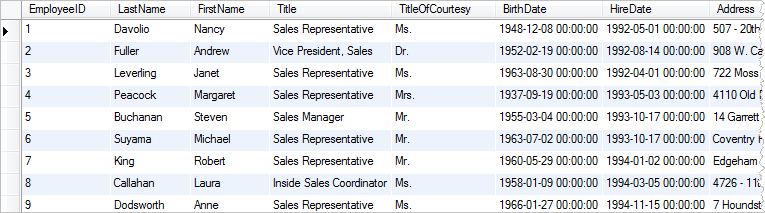
This sample table can serve as a foundation for demonstrating various SQL queries and operations in your blog, such as selecting specific columns, filtering data, performing aggregations, and more.
SQL Basics
SELECT Statement
The SELECT statement is used to retrieve data from one or more tables. Here’s an example of a SELECT statement:
SELECT * FROM sales;
In this example, the * symbol selects all the columns in the sales table. You can also specify which columns you want to select by listing them out, like this:
SELECT order_id, customer_id, order_date FROM sales;
FROM Statement
The FROM statement specifies the table from which you want to retrieve data. Here’s an example:
SELECT * FROM sales;
In this example, we’re retrieving data from the sales table.
WHERE Statement
The WHERE statement is used to filter data based on a certain condition. Here’s an example:
SELECT * FROM sales WHERE customer_id = 'C001';
In this example, we’re retrieving data from the sales table where the customer_id is equal to ‘C001’.
GROUP BY Statement
The GROUP BY statement is used to group data based on a certain column. Here’s an example:
SELECT customer_id, SUM(sales_amount) FROM sales GROUP BY customer_id;
In this example, we’re grouping the data by customer_id and calculating the sum of sales_amount for each customer.
JOIN Statement
The JOIN statement is used to combine data from two or more tables. Here’s an example:
SELECT * FROM sales JOIN customers ON sales.customer_id = customers.customer_id;In this example, we’re joining the sales table with the customers table on the customer_id column.
Conclusion
SQL is an essential tool for data analysts to extract and manipulate data from databases. In this blog post, we covered the basics of SQL, including how to use SELECT, FROM, WHERE, GROUP BY, and JOIN statements to retrieve and analyze data. With practice, you can become proficient in SQL and take your data analytics skills to the next level.
 EAT SLEEP DATA REPEAT
Leave a comment